Sunday, 27 October 2013

JoikuSpot Light Use WiFi Out...


JoikuSpot Light
FREE WiFi HotSpot

Turn your phone into WiFi HotSpot
with FREE JoikuSpot Light Mobile App
  • Free version turns your Nokia Symbian phone into an open WiFi HotSpot. Anyone can connect
  • HTTP internet protocol only. Full internet and email protocol available in Premium Edition
  • Limited Feature Set in Free Edition. Get the JoikuSpot Premium Edition if you need to secure your WiFi HotSpot and use all web sites, intranet and email clients via your HotSpot
  • Other Joiku Products
Read more
Btnwebdownload Btnmobiledownload

Fixing Certificate Errors On Symbian Mobile Phones

Tested Working....


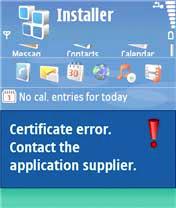
If you use an Symbian S60 3rd edition based mobile phone (Nokia N-Series phones like N73, N95, N80, N91, N80 and E-Series phones use Symbian S60v3 as OS) you must have encountered the very common certificate errors like 'Certificate Expired' or 'Certificate Error. Contact Application Supplier' while installing themes or software's on your phone.

Read more: Fixing Certificate Errors On Symbian Mobile Phones | Megaleecher.Net http://www.megaleecher.net/Fix_Certificate_Errors#ixzz2izIyh0CM

Nokia Certificate Error
The errors are caused because of the security measures introduced into the new version of Symbian Series 60 mobile operating system disallowing installation of old applications and invalid certificates, however bypassing this security feature and fixing these certificate errors to install themes and software's is very easy, simply follow the instructions below:
  1. Open you mobile main Menu.
  2. Navigate to Settings -> General -> Date and time
  3. Now change the year back one year.Fix Certificate Error

  1. Now install the application.
  2. Don't forget to change date back to original.
If the above does not solve the problem goto Application Manager > Options > Settings and set "Online Certificate check" = Off and Software Installation = All.


UPDATE: If you own an older phone you might receive the following error:
"Installation security error. Unable to install"
To solve this error and install application/Theme navigate to Tools -> Options -> Setting -> Software Installation and change setting to On.

Thursday, 30 May 2013

To Solve “BOOTMGR is missing” Error in Vista and Windows 7.


How to fix Bootmgr missing on Windows 7


Please try the following suggestions to see if the issue can be resolved:

Method 1:
======
Note: Please ensure that the DVD-ROM is the first booting device.

1.     Please insert the Windows 7 DVD and reboot the computer.
2.     When we are prompted to press a key to boot from the DVD, please press Enter or the space bar.
3.     Choose your language settings, and then click "Next".
4.     Click "Repair your computer".
5.     Select the operating system you want to repair, and then click "Next".
6.     On the System Recovery Options menu, click "Startup Repair". Startup Repair might prompt you to make choices as it tries to fix the problem, and if necessary, it might restart your computer as it makes repairs.

Method 2:
======
1.     Boot from WINDOWS 7 DVD.
2.     Select "Repair computer".
3.     Select "Cancel" to exit the repair wizard.
4.     You will now get a screen which displays 'command prompt', 'system restore', 'memory diagnostics', etc…
5.     Select "command prompt".
6.     Type your "DVD-DRIVE LETTER" in command prompt, press ENTER.
7.     Now if your Windows 7 is installed in C drive, type "copy bootmgr c:\" without codes, press ENTER.
8.     After successful copy type "exit" without codes, press ENTER.
9.     Reboot computer.
10.  Select "start windows normally".


If This Is Not Working

Try This youtube Link